> ## Documentation Index
> Fetch the complete documentation index at: https://docs.kubestacks.com/llms.txt
> Use this file to discover all available pages before exploring further.
# Edit YAML
> Change any object as YAML, like kubectl edit, with the cluster checking your change and showing it as a diff before anything is saved.
When an action doesn't cover what you need, edit the object's YAML. It works like `kubectl edit`, with two differences: the cluster checks your change before it's saved, and a change someone made in the meantime is caught instead of overwritten.
 ## Edit an object
Open the object, then choose **Edit YAML** from its actions, or **Edit** in its **YAML** tab.
The editor shows the object without its `status` and the metadata the server manages (`uid`, `creationTimestamp`, `generation`, `resourceVersion` and `managedFields`), so you only see what you can change.
Press ⌘S, or choose **Review changes**. KubeStacks sends your change to the cluster as a dry run: the API server checks it the way it checks a real save, and saves nothing.
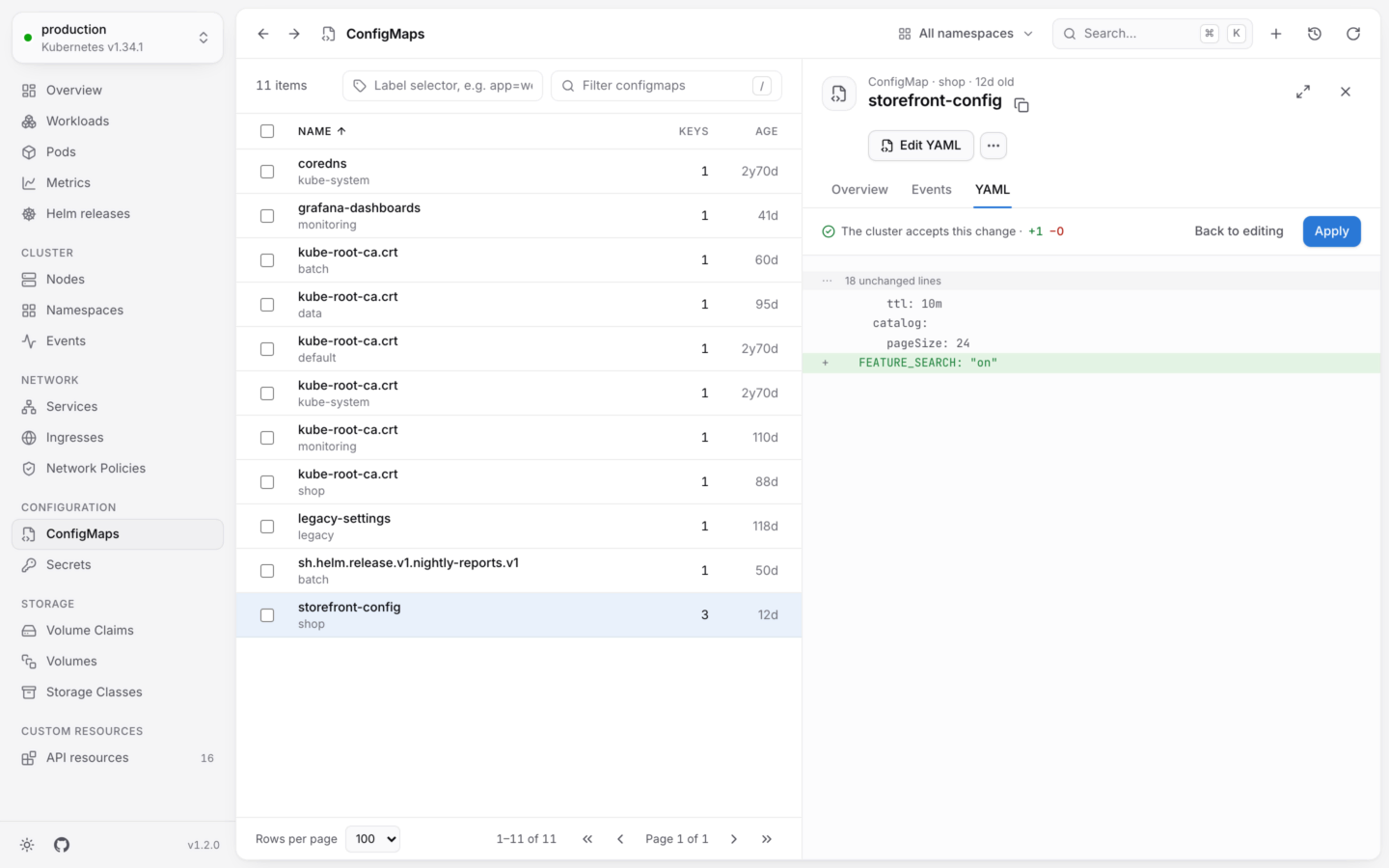
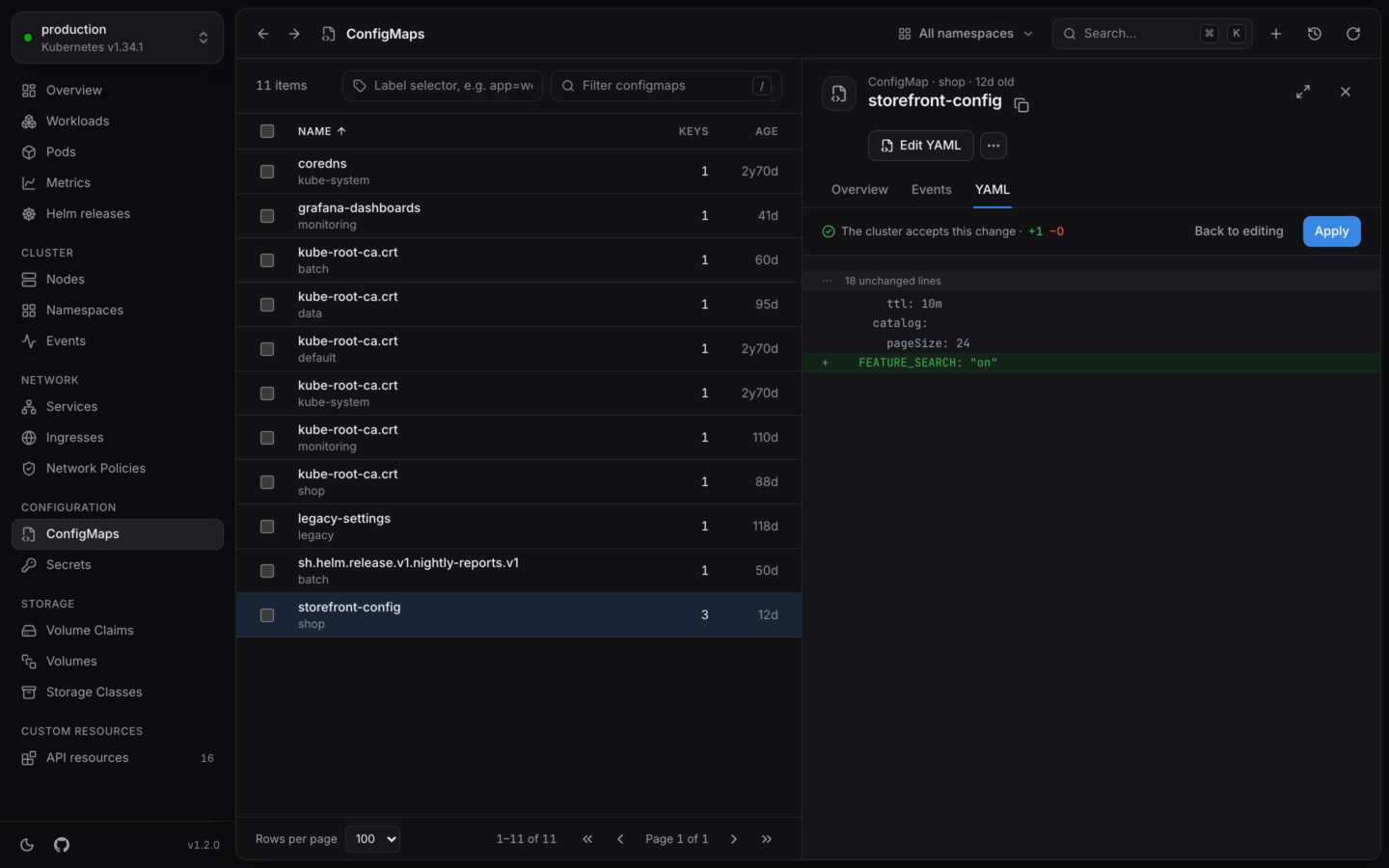
If the cluster accepts it, you see **The cluster accepts this change**, with how many lines were added and removed, and a diff. If it doesn't, you see why, and you're still editing.
Choose **Apply** to save the change, or **Back to editing** to keep working on it. **Cancel** leaves the editor without saving.
On Windows and Linux, press CtrlS instead.
The equivalent command is `kubectl edit`, with the object, its namespace and the context. Like every change, the edit shows up in the **Activity** log.
## In the editor
* The YAML must describe a single object.
* The editor has search and undo, and Tab indents.
* Esc doesn't close the panel while you're editing, so you won't lose your change by accident. The panel stays on the **YAML** tab until you apply or cancel.
* Your edit applies to the version you started from, even while the panel refreshes around you.
## When someone else changed it
KubeStacks saves your edit against the version you started from, the same way `kubectl` does. If the object changed in the meantime (someone else edited it, or a controller updated it), the cluster refuses the save, and KubeStacks says so instead of overwriting their change.
Choose **Start over from the latest** to load the current version, then make your change again.
## Secrets
Secret values are base64-encoded in the cluster. In the editor, you edit them as text:
* Values that are text appear decoded, under `stringData`.
* Values that aren't valid text (a binary keystore, say) stay base64-encoded, under `data`.
* When you save, KubeStacks encodes everything back into `data`.
```yaml theme={"theme":{"light":"github-light","dark":"github-dark-default"}}
apiVersion: v1
kind: Secret
metadata:
name: api
namespace: shop
type: Opaque
stringData:
username: admin
password: s3cret-value
```
While you edit a Secret, its values are on screen in plain text. Outside the editor, the **YAML** tab hides them until you choose **Reveal values**.
## Permissions and read-only clusters
Editing needs `update` on the object. Without it, **Edit** is disabled and says why. In a [read-only](/changes/read-only) cluster, editing is off, and so are the dry runs behind **Review changes**.
New objects, from a template or pasted, checked before any is created.
The guard rails around every change.
This documentation is built and hosted on [Mintlify](https://mintlify.com), a developer documentation platform.
## Edit an object
Open the object, then choose **Edit YAML** from its actions, or **Edit** in its **YAML** tab.
The editor shows the object without its `status` and the metadata the server manages (`uid`, `creationTimestamp`, `generation`, `resourceVersion` and `managedFields`), so you only see what you can change.
Press ⌘S, or choose **Review changes**. KubeStacks sends your change to the cluster as a dry run: the API server checks it the way it checks a real save, and saves nothing.
If the cluster accepts it, you see **The cluster accepts this change**, with how many lines were added and removed, and a diff. If it doesn't, you see why, and you're still editing.
Choose **Apply** to save the change, or **Back to editing** to keep working on it. **Cancel** leaves the editor without saving.
On Windows and Linux, press CtrlS instead.
The equivalent command is `kubectl edit`, with the object, its namespace and the context. Like every change, the edit shows up in the **Activity** log.
## In the editor
* The YAML must describe a single object.
* The editor has search and undo, and Tab indents.
* Esc doesn't close the panel while you're editing, so you won't lose your change by accident. The panel stays on the **YAML** tab until you apply or cancel.
* Your edit applies to the version you started from, even while the panel refreshes around you.
## When someone else changed it
KubeStacks saves your edit against the version you started from, the same way `kubectl` does. If the object changed in the meantime (someone else edited it, or a controller updated it), the cluster refuses the save, and KubeStacks says so instead of overwriting their change.
Choose **Start over from the latest** to load the current version, then make your change again.
## Secrets
Secret values are base64-encoded in the cluster. In the editor, you edit them as text:
* Values that are text appear decoded, under `stringData`.
* Values that aren't valid text (a binary keystore, say) stay base64-encoded, under `data`.
* When you save, KubeStacks encodes everything back into `data`.
```yaml theme={"theme":{"light":"github-light","dark":"github-dark-default"}}
apiVersion: v1
kind: Secret
metadata:
name: api
namespace: shop
type: Opaque
stringData:
username: admin
password: s3cret-value
```
While you edit a Secret, its values are on screen in plain text. Outside the editor, the **YAML** tab hides them until you choose **Reveal values**.
## Permissions and read-only clusters
Editing needs `update` on the object. Without it, **Edit** is disabled and says why. In a [read-only](/changes/read-only) cluster, editing is off, and so are the dry runs behind **Review changes**.
New objects, from a template or pasted, checked before any is created.
The guard rails around every change.
This documentation is built and hosted on [Mintlify](https://mintlify.com), a developer documentation platform.