> ## Documentation Index
> Fetch the complete documentation index at: https://docs.kubestacks.com/llms.txt
> Use this file to discover all available pages before exploring further.
# Config and storage
> ConfigMaps and Secrets, and the volumes, claims and storage classes your workloads keep their data on.
The sidebar's **Configuration** and **Storage** sections hold five lists:
| List | Shortcut | Columns |
| - | - | - |
| **ConfigMaps** | G F | Keys |
| **Secrets** | G X | Type, Keys |
| **Volume Claims** | G L | Capacity, Storage class, Volume |
| **Volumes** | From the sidebar or ⌘K | Capacity, Claim, Storage class, Reclaim |
| **Storage Classes** | From the sidebar or ⌘K | Default, Provisioner, Reclaim, Binding |
Volumes and storage classes aren't in a namespace, so their lists always show all of them. (⌘ is Ctrl on Windows and Linux.)
## ConfigMaps
Open a ConfigMap and its **Data** section shows each key with its value, as text. Binary values (`binaryData`) are counted in the **Keys** column, and are in the YAML.
## Secrets
Secret values stay hidden until you ask for them.
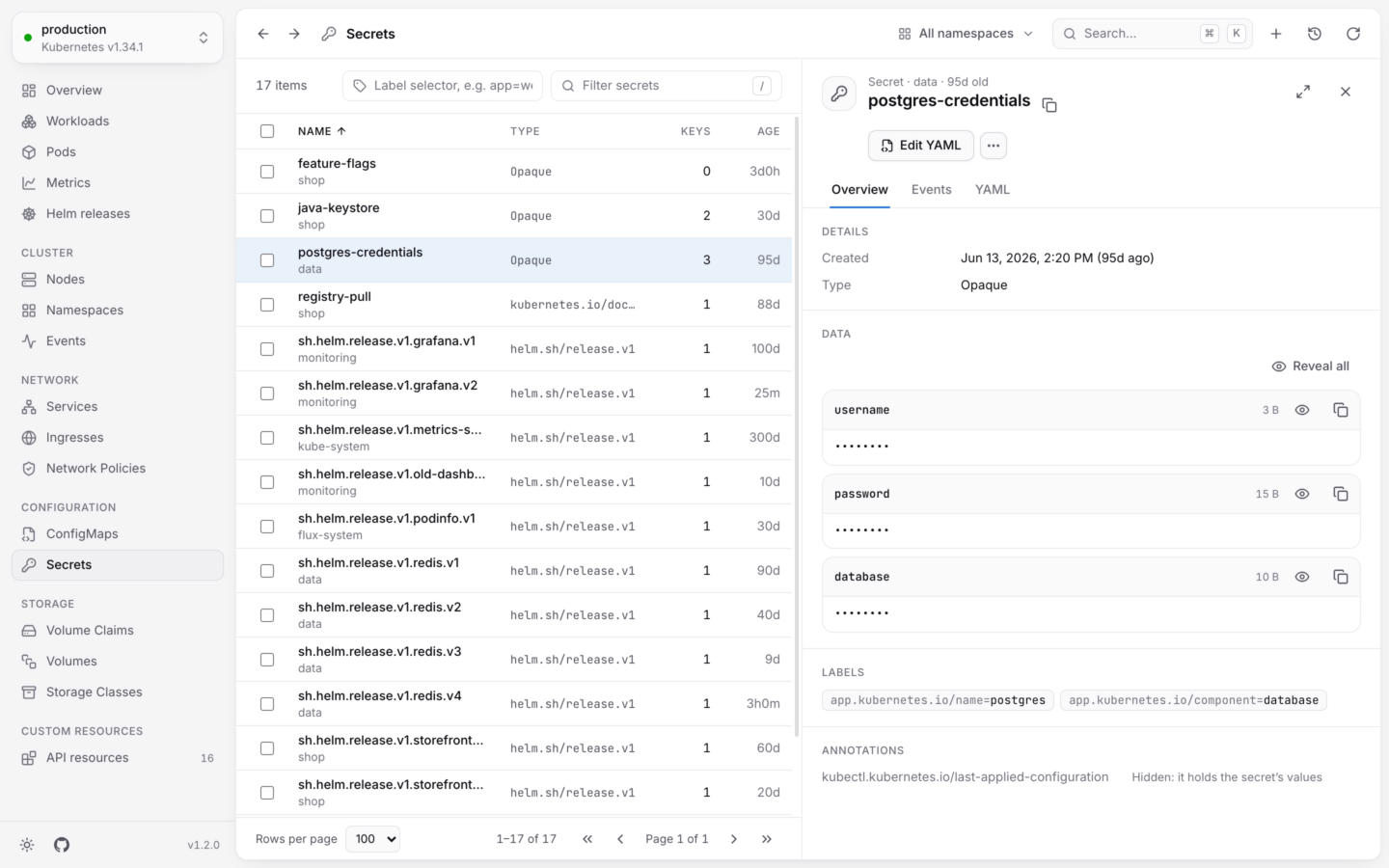
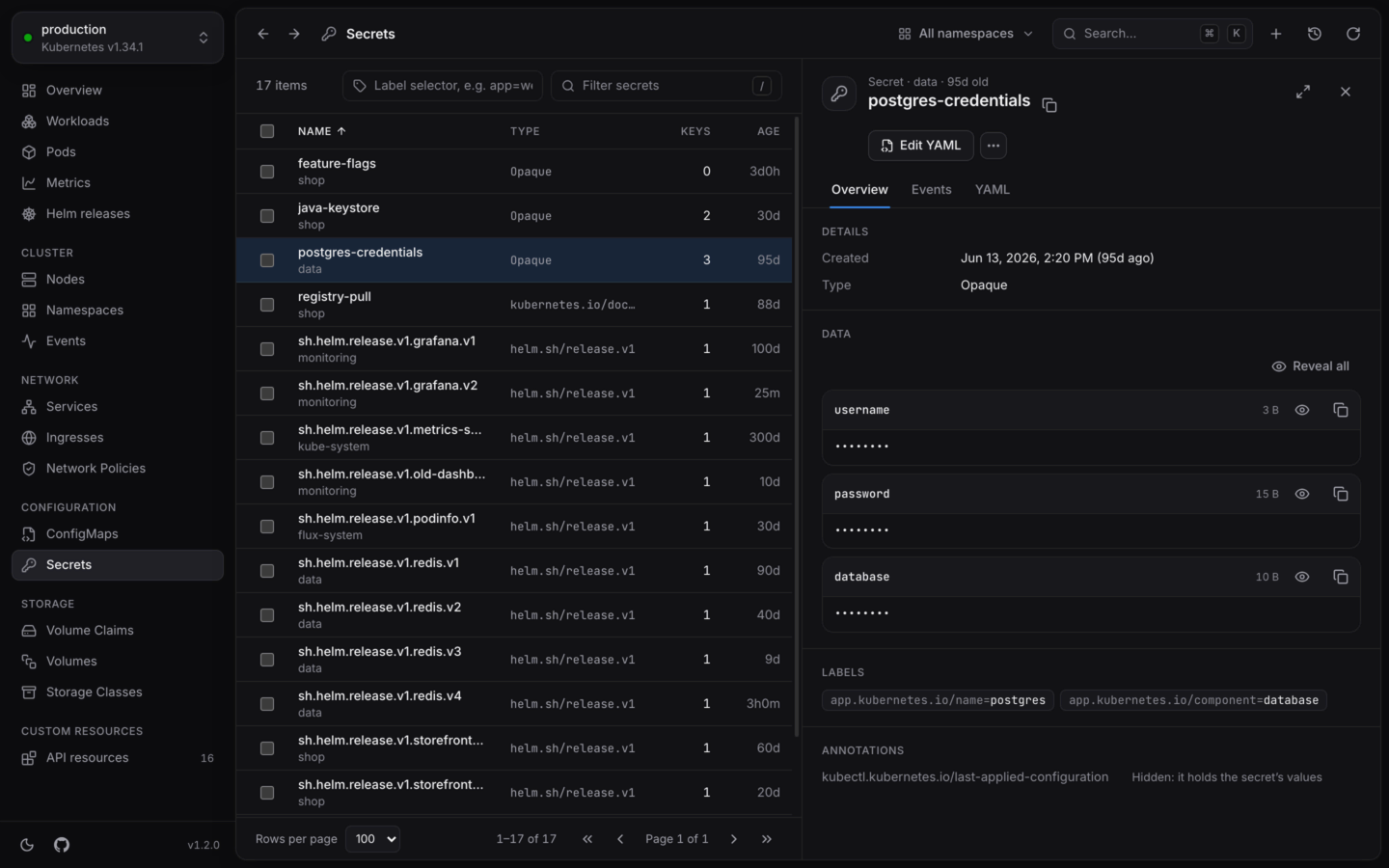 * **The list** shows each secret's type and how many keys it has. KubeStacks drops the values before the list reaches the page.
* **Data** shows each key with its size, and its value as `••••••••`. Reveal one key with its eye button, or all of them with **Reveal all**. Values are decoded from base64 for you.
* **Copy** next to a key copies its value without revealing it, for pasting somewhere safe.
* **YAML** hides values too, until you choose **Reveal values**. The `kubectl.kubernetes.io/last-applied-configuration` annotation holds a copy of the values, so it's hidden as well. Under **Annotations** in **Overview**, it reads *Hidden: it holds the secret's values*.
### Editing a secret
When you edit a Secret's YAML, its text values appear decoded, under `stringData`, so you can read and change them as text. Values that aren't text stay base64-encoded under `data`. On save, everything is encoded back into `data`. See [Edit YAML](/changes/yaml).
## Volume claims
* **The list** shows each secret's type and how many keys it has. KubeStacks drops the values before the list reaches the page.
* **Data** shows each key with its size, and its value as `••••••••`. Reveal one key with its eye button, or all of them with **Reveal all**. Values are decoded from base64 for you.
* **Copy** next to a key copies its value without revealing it, for pasting somewhere safe.
* **YAML** hides values too, until you choose **Reveal values**. The `kubectl.kubernetes.io/last-applied-configuration` annotation holds a copy of the values, so it's hidden as well. Under **Annotations** in **Overview**, it reads *Hidden: it holds the secret's values*.
### Editing a secret
When you edit a Secret's YAML, its text values appear decoded, under `stringData`, so you can read and change them as text. Values that aren't text stay base64-encoded under `data`. On save, everything is encoded back into `data`. See [Edit YAML](/changes/yaml).
## Volume claims
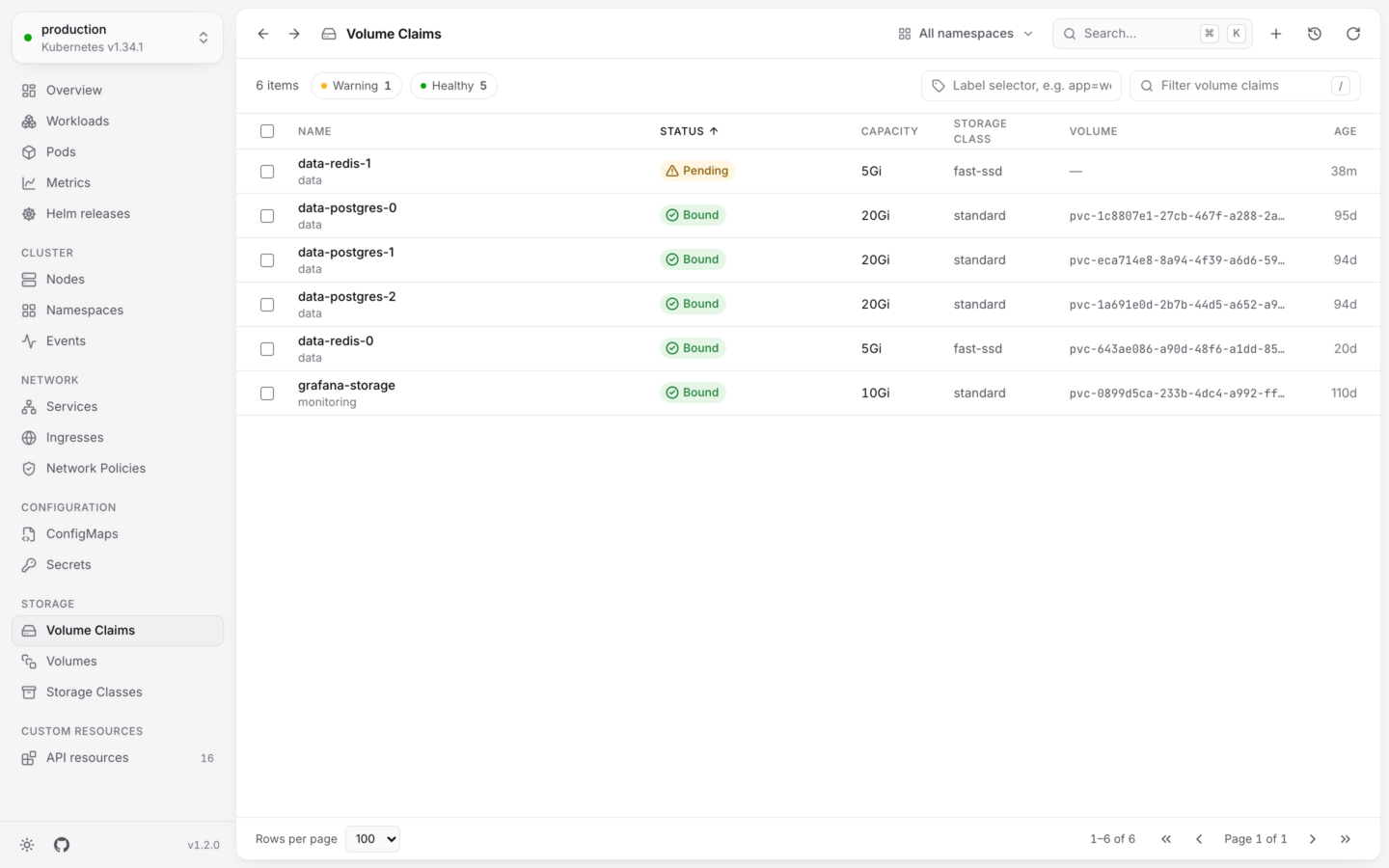
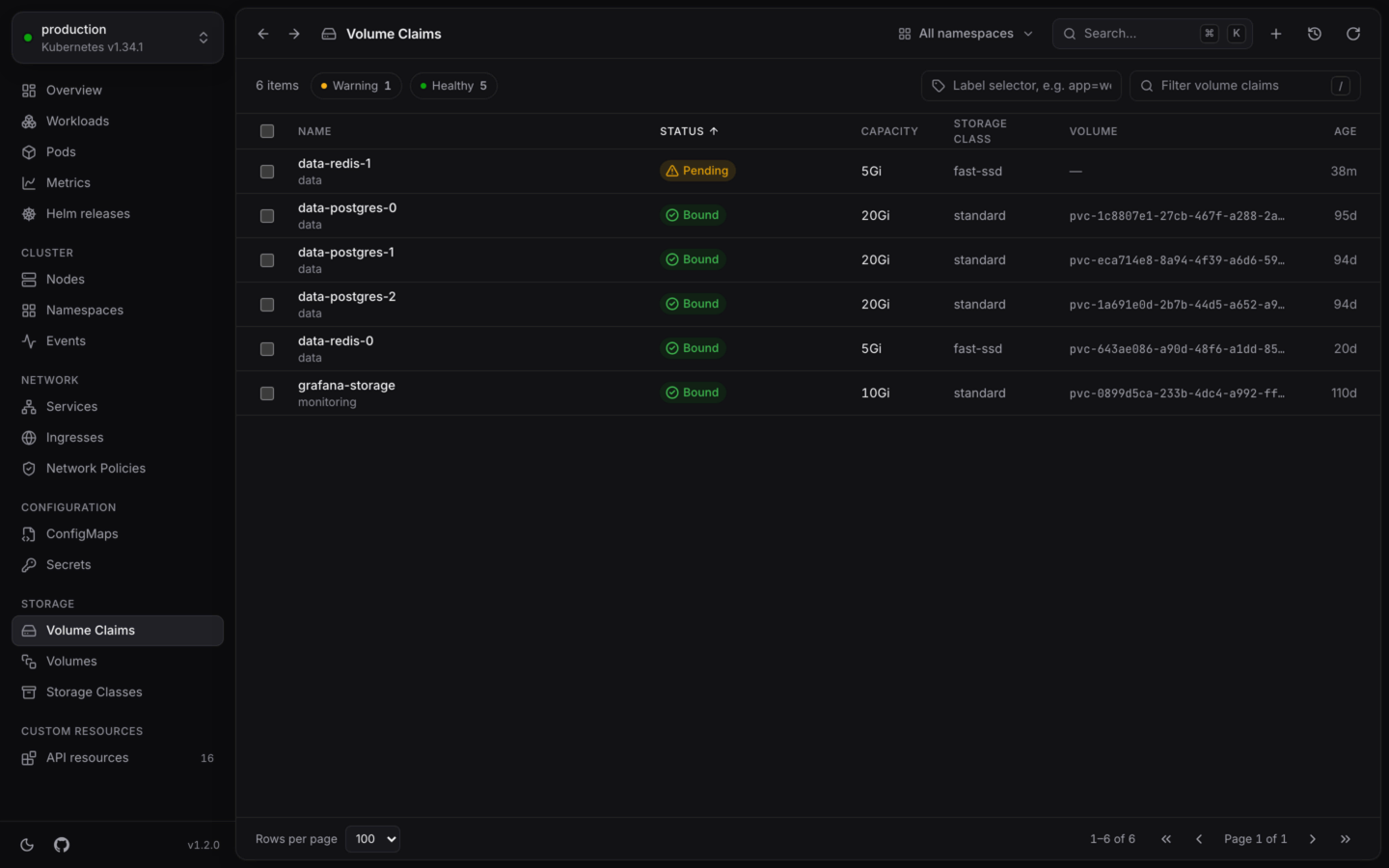 A claim is Bound when it has a volume, and shows its phase otherwise, like Pending. Open one for its capacity and the size it asked for, its access and volume modes, and links to its storage class and volume.
**Expand volume…** grows a bound claim. Pick the new size in Mi, Gi or Ti. It starts at about twice the current size, and must be larger than it is now: volumes can't shrink. If the claim's storage class doesn't allow expansion, KubeStacks says so instead of trying. See [Actions by kind](/changes/actions).
## Volumes
A volume is Bound or Available when all is well, and shows its phase otherwise, like Released. Open one for its capacity, access modes, reclaim policy, storage class, and a link to the claim that holds it.
## Storage classes
Open a storage class for whether it's the **Default**, its provisioner, reclaim policy and binding mode, whether **Volume expansion** is allowed, and its parameters.
Deleting a volume claim, a volume or a storage class can lose data, so KubeStacks asks you to type its name first. See [Changing things safely](/changes/safely).
Change any object, checked by the cluster and shown as a diff first.
Everything the detail panel shows, tab by tab.
This documentation is built and hosted on [Mintlify](https://mintlify.com), a developer documentation platform.
A claim is Bound when it has a volume, and shows its phase otherwise, like Pending. Open one for its capacity and the size it asked for, its access and volume modes, and links to its storage class and volume.
**Expand volume…** grows a bound claim. Pick the new size in Mi, Gi or Ti. It starts at about twice the current size, and must be larger than it is now: volumes can't shrink. If the claim's storage class doesn't allow expansion, KubeStacks says so instead of trying. See [Actions by kind](/changes/actions).
## Volumes
A volume is Bound or Available when all is well, and shows its phase otherwise, like Released. Open one for its capacity, access modes, reclaim policy, storage class, and a link to the claim that holds it.
## Storage classes
Open a storage class for whether it's the **Default**, its provisioner, reclaim policy and binding mode, whether **Volume expansion** is allowed, and its parameters.
Deleting a volume claim, a volume or a storage class can lose data, so KubeStacks asks you to type its name first. See [Changing things safely](/changes/safely).
Change any object, checked by the cluster and shown as a diff first.
Everything the detail panel shows, tab by tab.
This documentation is built and hosted on [Mintlify](https://mintlify.com), a developer documentation platform.