> ## Documentation Index
> Fetch the complete documentation index at: https://docs.kubestacks.com/llms.txt
> Use this file to discover all available pages before exploring further.
# Nodes
> Every node's health and load, what runs on it, and safe ways to take it out of service.
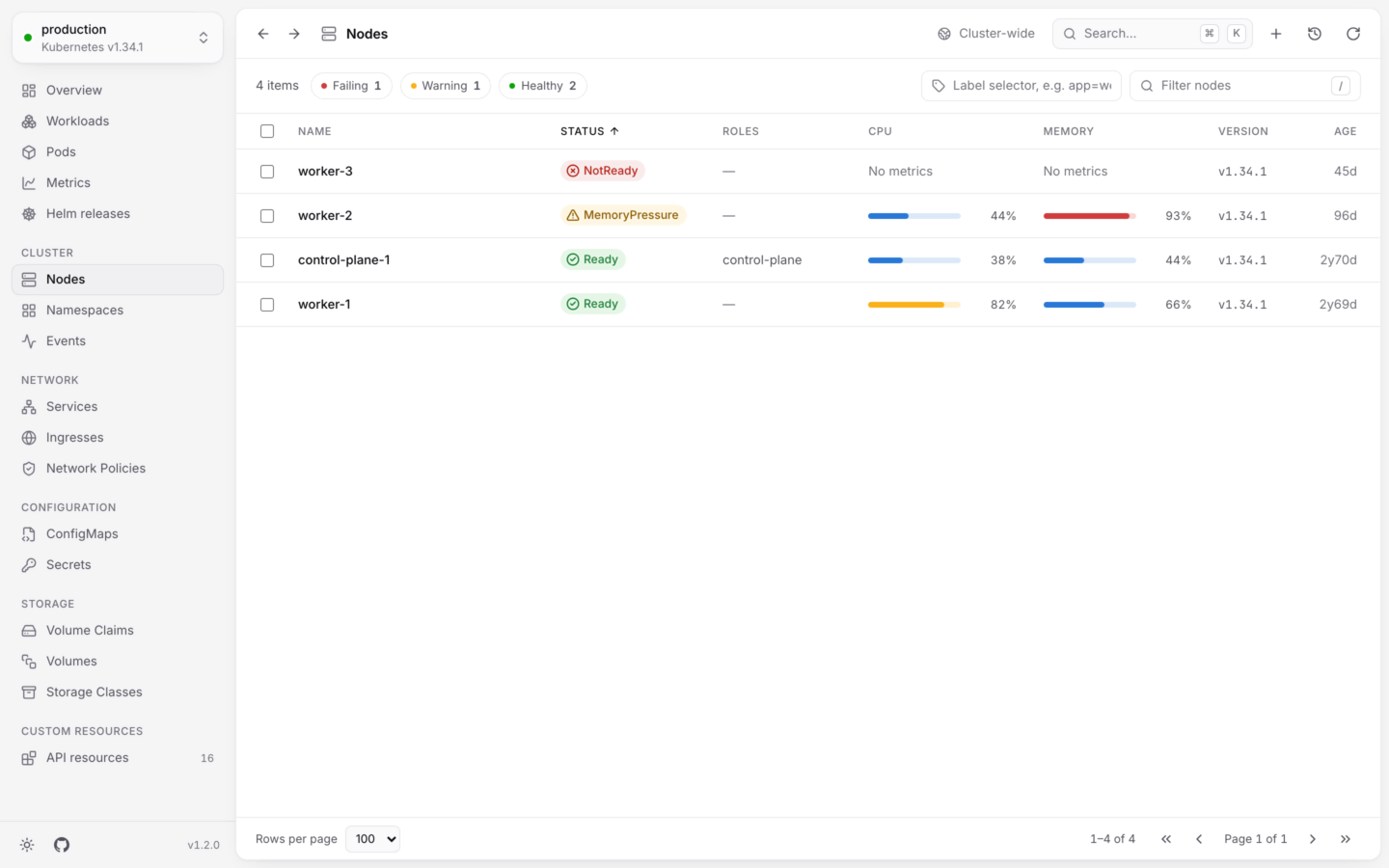
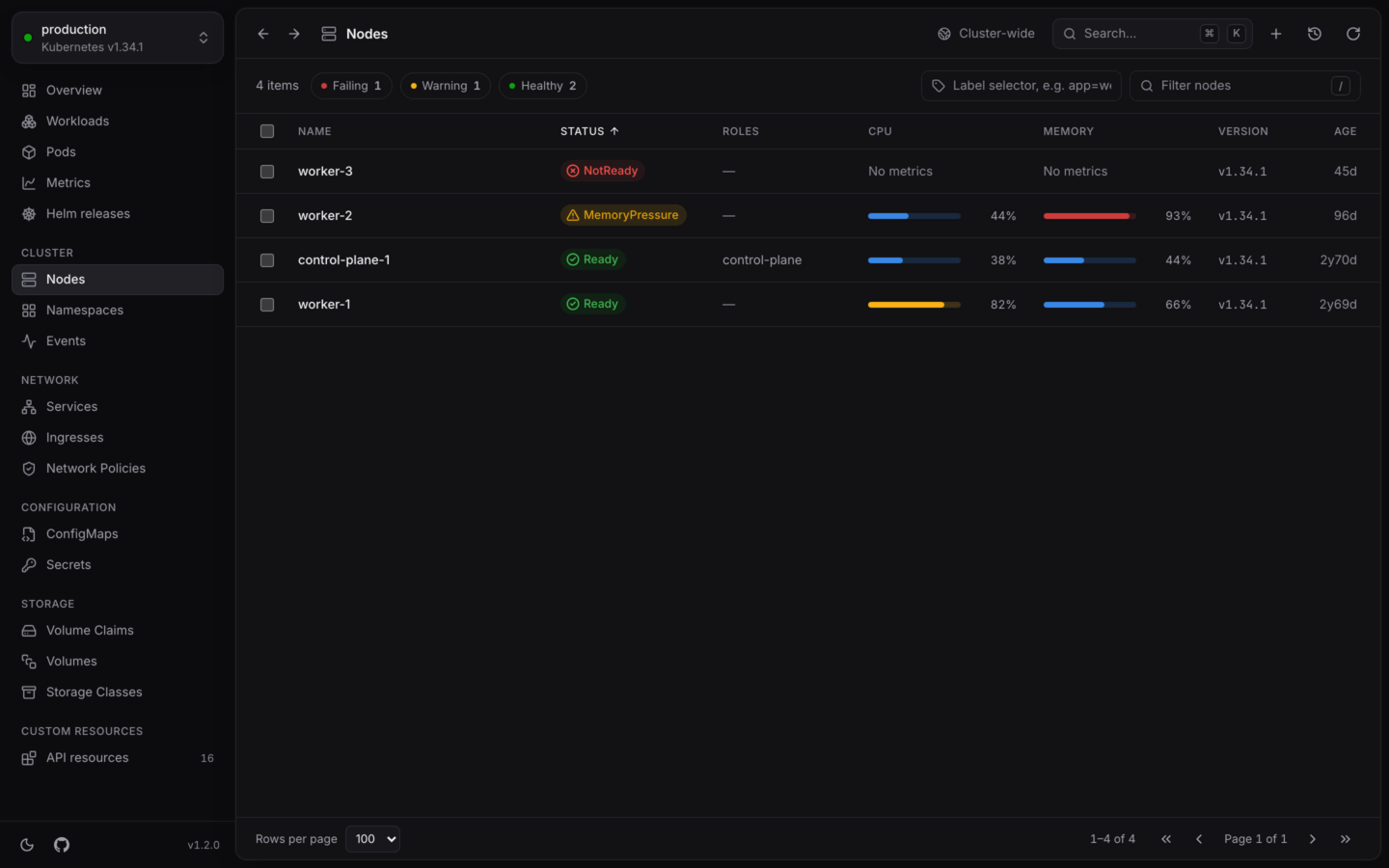
**Nodes** lists the machines in the cluster, with the ones in trouble first. Open it from the sidebar under **Cluster**, with G then N, or with ⌘5 in the desktop app (Ctrl5 on Windows and Linux). Nodes aren't in a namespace, so the list always shows all of them.
 ## The list
| Column | Shows |
| - | - |
| **Status** | Whether the node is ready, and anything wrong with it |
| **Roles** | Its roles, like `control-plane` |
| **CPU**, **Memory** | Meters of live use against what the node can give its pods. Without [metrics-server](/metrics/live-usage), the node's allocatable capacity. |
| **Version** | The kubelet's Kubernetes version |
| **Age** | How long ago it joined |
A node's status is one of:
| Status | Means |
| - | - |
| Ready | It's ready, with no pressure and nothing turned off. |
| NotReady | Its `Ready` condition isn't `True`: the node isn't healthy, or has stopped reporting. |
| MemoryPressure | Another of its conditions is `True`, and the label names it, like `MemoryPressure`, `DiskPressure` or `PIDPressure`. |
| Cordoned | It's marked unschedulable, so no new pods go there. |
## Open a node
## The list
| Column | Shows |
| - | - |
| **Status** | Whether the node is ready, and anything wrong with it |
| **Roles** | Its roles, like `control-plane` |
| **CPU**, **Memory** | Meters of live use against what the node can give its pods. Without [metrics-server](/metrics/live-usage), the node's allocatable capacity. |
| **Version** | The kubelet's Kubernetes version |
| **Age** | How long ago it joined |
A node's status is one of:
| Status | Means |
| - | - |
| Ready | It's ready, with no pressure and nothing turned off. |
| NotReady | Its `Ready` condition isn't `True`: the node isn't healthy, or has stopped reporting. |
| MemoryPressure | Another of its conditions is `True`, and the label names it, like `MemoryPressure`, `DiskPressure` or `PIDPressure`. |
| Cordoned | It's marked unschedulable, so no new pods go there. |
## Open a node
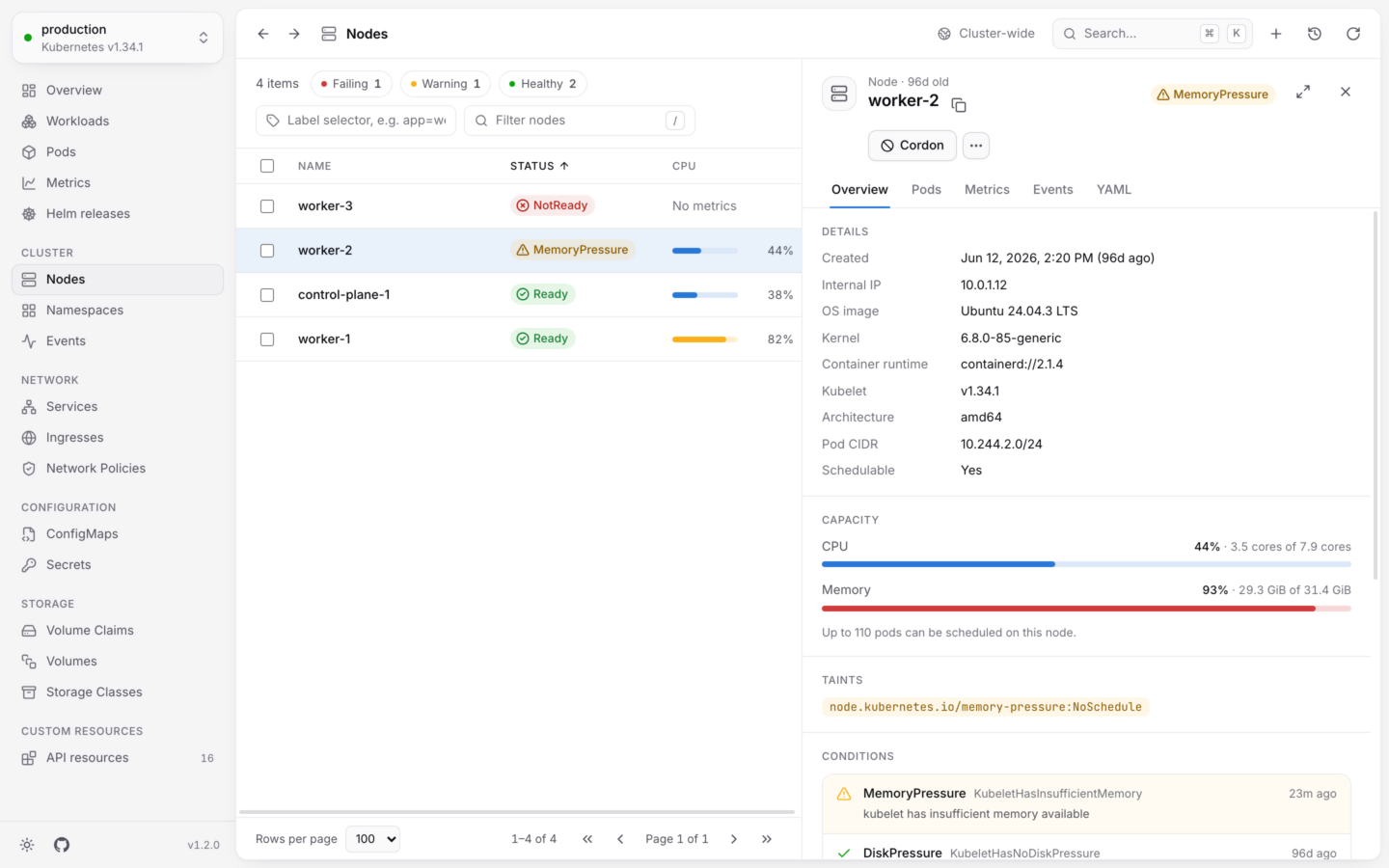
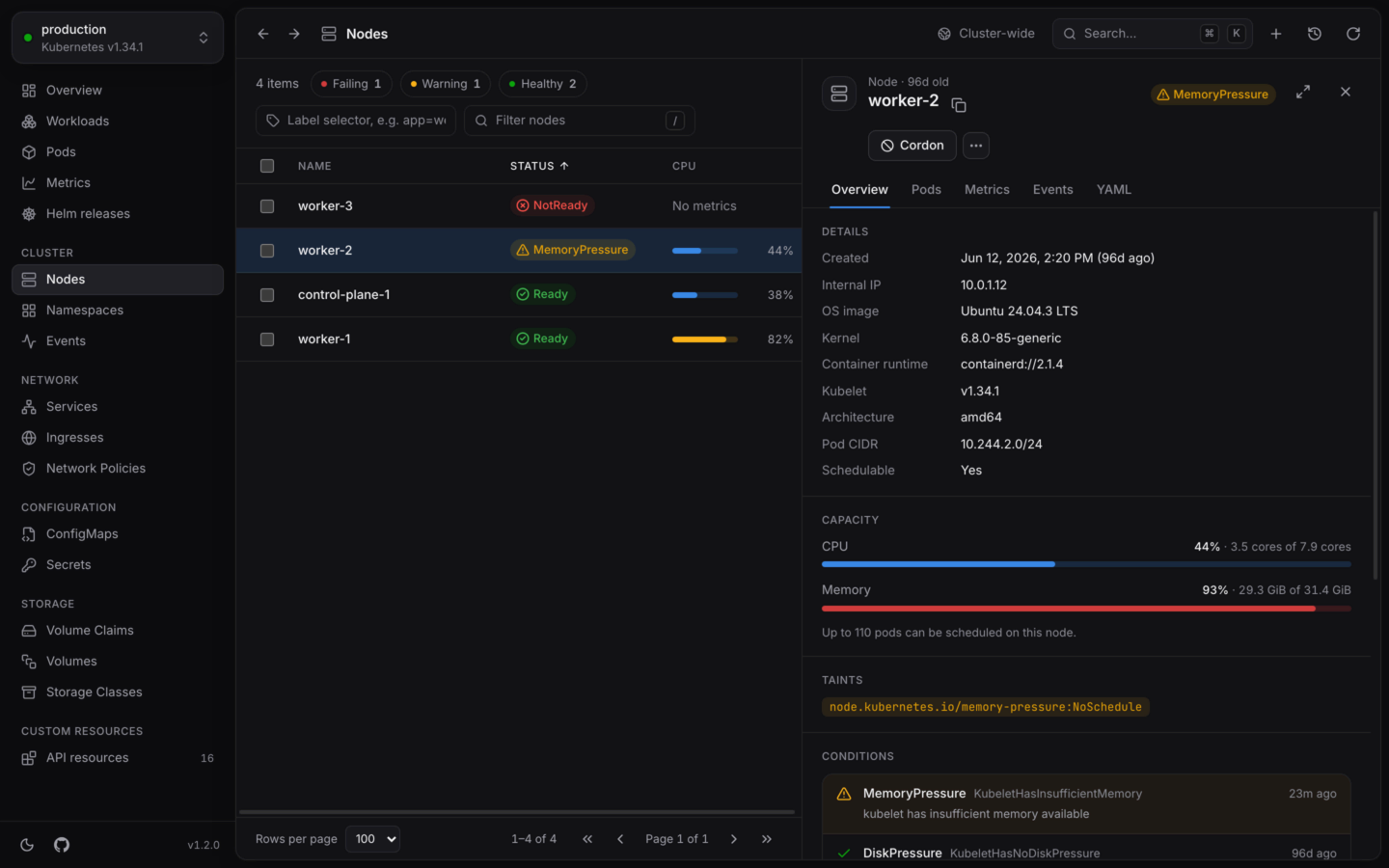 **Overview** has:
* **Details**: its internal IP, OS image, kernel, container runtime, kubelet version, architecture, pod CIDR, and whether it's **Schedulable**.
* **Capacity**: CPU and memory in use against what's allocatable, and how many pods can be scheduled on it.
* **Taints**, when it has any.
* **Conditions**, labels and annotations.
**Pods** lists every pod running on the node, from every namespace, failing ones first. **Metrics** charts its CPU and memory over time against its capacity, when KubeStacks has found your [usage history](/metrics/usage-history). **Events** and **YAML** are there as for any object. A node has no **Logs** tab: that would be everything on it.
## Take a node out of service
| Action | What it does |
| - | - |
| **Cordon** | Marks the node unschedulable. Pods on it keep running, and no new ones arrive. Undo it from the notification. |
| **Uncordon** | Makes it schedulable again. |
| **Drain…** | Cordons it, then evicts its pods so they're rescheduled elsewhere. |
A drain, like `kubectl drain --ignore-daemonsets`, leaves DaemonSet pods and static pods where they are. Two options cover the pods that would otherwise stop it:
* **Delete local data**, for pods with `emptyDir` volumes, whose data is lost (`--delete-emptydir-data`).
* **Evict pods without a controller**, for pods that nothing will recreate (`--force`).
**Drain** stays disabled until the options the node's pods need are ticked. Evictions respect PodDisruptionBudgets, and the dialog shows each pod's progress, with **Retry** for any a budget refused. In a cluster named like production, you type the node's name first.
Pick several nodes with X to cordon or uncordon them together. More in [Actions by kind](/changes/actions).
Every action, with what it runs and what it can undo.
Where the CPU and memory figures come from.
This documentation is built and hosted on [Mintlify](https://mintlify.com), a developer documentation platform.
**Overview** has:
* **Details**: its internal IP, OS image, kernel, container runtime, kubelet version, architecture, pod CIDR, and whether it's **Schedulable**.
* **Capacity**: CPU and memory in use against what's allocatable, and how many pods can be scheduled on it.
* **Taints**, when it has any.
* **Conditions**, labels and annotations.
**Pods** lists every pod running on the node, from every namespace, failing ones first. **Metrics** charts its CPU and memory over time against its capacity, when KubeStacks has found your [usage history](/metrics/usage-history). **Events** and **YAML** are there as for any object. A node has no **Logs** tab: that would be everything on it.
## Take a node out of service
| Action | What it does |
| - | - |
| **Cordon** | Marks the node unschedulable. Pods on it keep running, and no new ones arrive. Undo it from the notification. |
| **Uncordon** | Makes it schedulable again. |
| **Drain…** | Cordons it, then evicts its pods so they're rescheduled elsewhere. |
A drain, like `kubectl drain --ignore-daemonsets`, leaves DaemonSet pods and static pods where they are. Two options cover the pods that would otherwise stop it:
* **Delete local data**, for pods with `emptyDir` volumes, whose data is lost (`--delete-emptydir-data`).
* **Evict pods without a controller**, for pods that nothing will recreate (`--force`).
**Drain** stays disabled until the options the node's pods need are ticked. Evictions respect PodDisruptionBudgets, and the dialog shows each pod's progress, with **Retry** for any a budget refused. In a cluster named like production, you type the node's name first.
Pick several nodes with X to cordon or uncordon them together. More in [Actions by kind](/changes/actions).
Every action, with what it runs and what it can undo.
Where the CPU and memory figures come from.
This documentation is built and hosted on [Mintlify](https://mintlify.com), a developer documentation platform.