> ## Documentation Index
> Fetch the complete documentation index at: https://docs.kubestacks.com/llms.txt
> Use this file to discover all available pages before exploring further.
# Helm releases
> Every release in the cluster, its values, what it made and every revision, read straight from the cluster without helm.
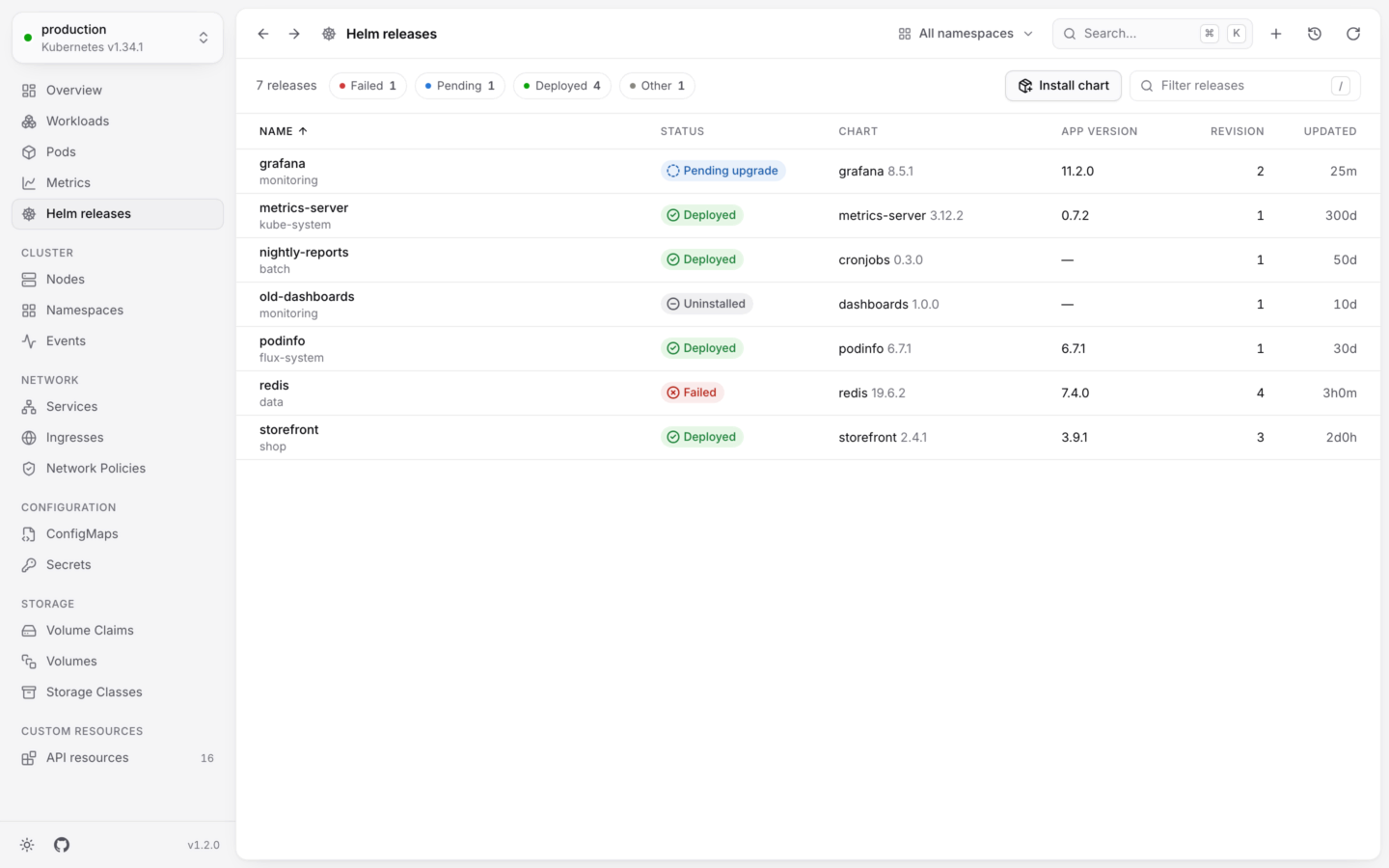
**Helm releases** lists every release in the cluster, or in the namespace you picked. Open it from the sidebar, or press G then H.
KubeStacks reads releases from where Helm itself keeps them, so looking needs no `helm` on your computer and no access beyond reading Secrets. Changing a release goes through your own `helm`: see [Upgrade and roll back](/helm/upgrade-and-rollback).
 ## The list
Each release shows its **Status**, **Chart** and version, **App version**, **Revision** and when it was **Updated**. Sort by any column; sorting by **Status** puts failed releases first. Press / to filter by name, namespace, chart or app version, or narrow the list by status with the chips:
| Chip | Statuses |
| - | - |
| Deployed | The release is running its latest revision. |
| Pending | An install, upgrade or rollback is under way: **Pending install**, **Pending upgrade**, **Pending rollback**. |
| Uninstalling | Helm is removing it. |
| Failed | The last install, upgrade or rollback failed. |
| Other | Anything else, like **Uninstalled** for a release kept with its history. |
The list refreshes every 15 seconds. **Install chart** at the top installs a new one: see [Install a chart](/helm/install).
## A release
Click a release to open it next to the list. Its actions (**Upgrade…**, **Roll back…** and **Uninstall…**) are at the top.
## The list
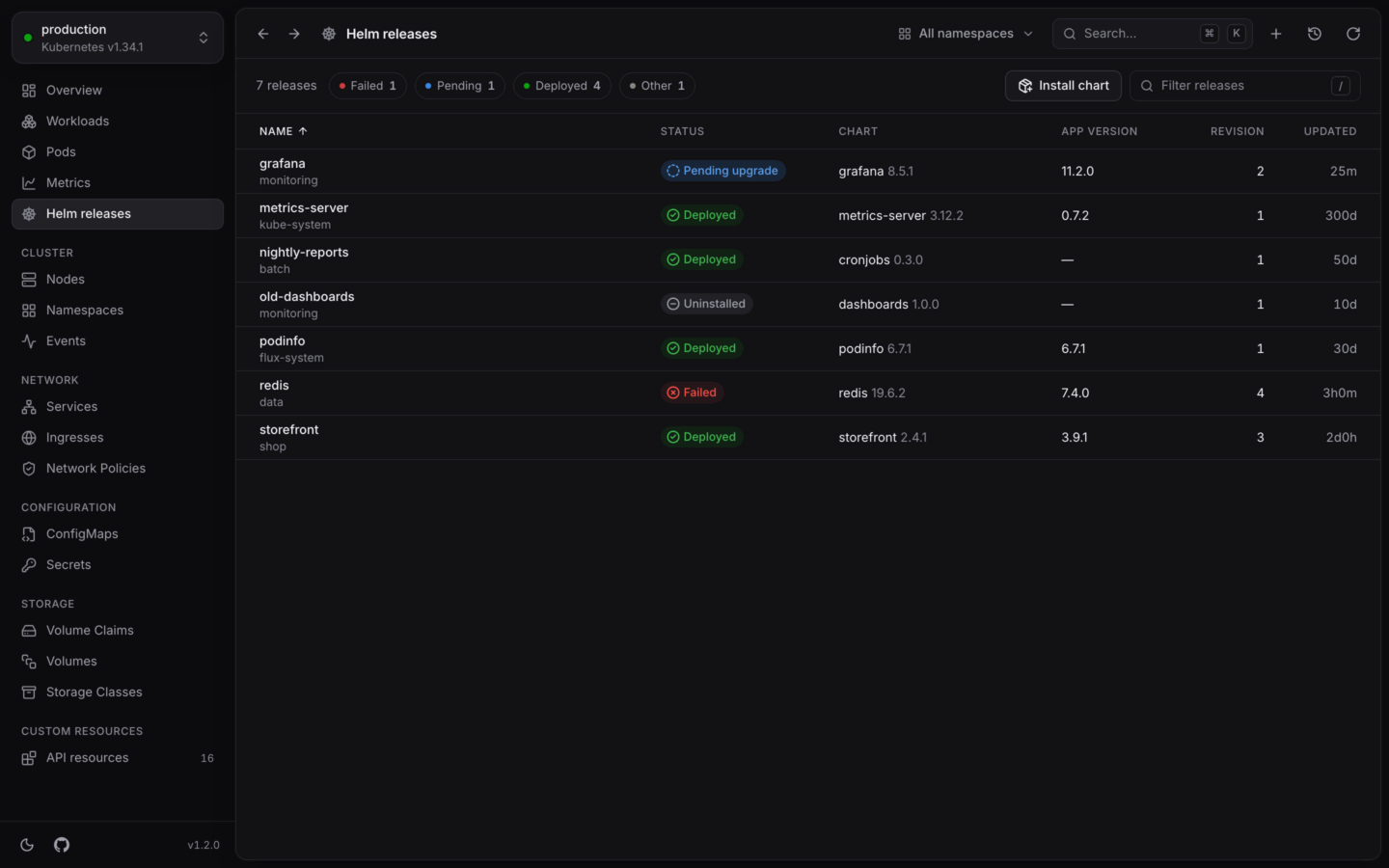
Each release shows its **Status**, **Chart** and version, **App version**, **Revision** and when it was **Updated**. Sort by any column; sorting by **Status** puts failed releases first. Press / to filter by name, namespace, chart or app version, or narrow the list by status with the chips:
| Chip | Statuses |
| - | - |
| Deployed | The release is running its latest revision. |
| Pending | An install, upgrade or rollback is under way: **Pending install**, **Pending upgrade**, **Pending rollback**. |
| Uninstalling | Helm is removing it. |
| Failed | The last install, upgrade or rollback failed. |
| Other | Anything else, like **Uninstalled** for a release kept with its history. |
The list refreshes every 15 seconds. **Install chart** at the top installs a new one: see [Install a chart](/helm/install).
## A release
Click a release to open it next to the list. Its actions (**Upgrade…**, **Roll back…** and **Uninstall…**) are at the top.
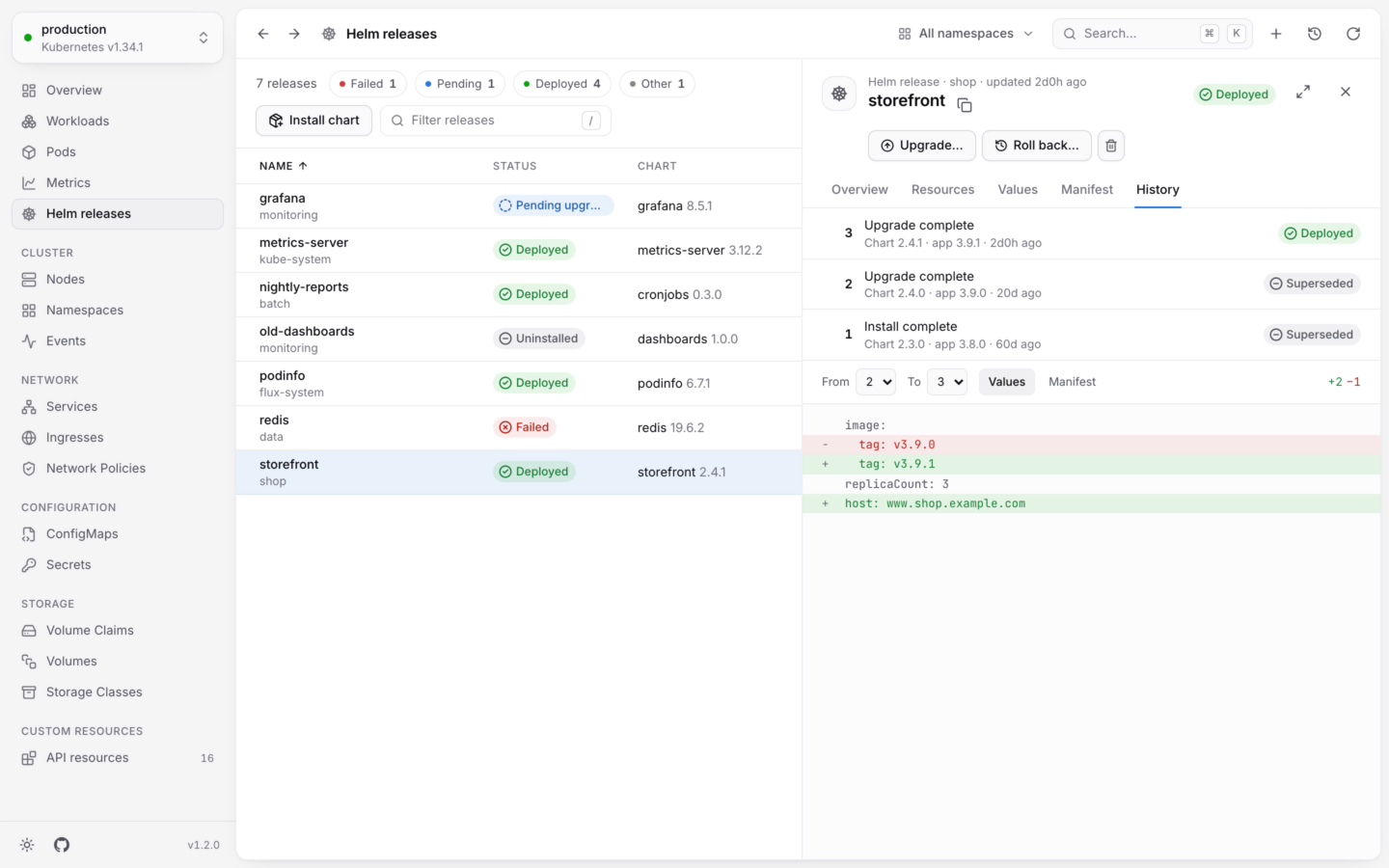
 The facts: **Chart** and its version, **App version**, **Revision**, **Last change** (Helm's description of it, like "Upgrade complete"), when it was **Installed** and **Updated**, what the chart says it is, and its **Subcharts**. Below them are the release's **Notes**, as `helm install` printed them.
Every object the release's manifest makes, with its live status from the cluster, so you can see at a glance whether what the chart made is healthy. An object the manifest lists that isn't in the cluster shows as Missing. Click any object to open it.
The values the release runs with, two ways:
* **Set for this release**: only what was set at install or upgrade, like `helm get values`.
* **With the chart's defaults**: the chart's own `values.yaml` with yours on top, merged the way Helm does (maps merge, anything else replaces, and `null` removes a key), like `helm get values --all`.
**Copy values** copies what's shown.
The YAML the release applied, as Helm rendered it.
Every revision, newest first, with its description, chart and app version, age and status. Pick any two with **From** and **To**, and compare their **values** or their **manifest**, with lines added and removed counted.
## Releases Flux manages
If a release is managed by [Flux](https://fluxcd.io)'s helm-controller, KubeStacks says so at the top of the release: Flux puts back changes made to it any other way. **Open its HelmRelease** takes you to the `HelmRelease` object, where you can reconcile, suspend or resume it with KubeStacks' [view for Flux](/custom-resources/built-in-views#flux). The upgrade, rollback and uninstall dialogs warn you too.
## What it needs
| To | Your account needs |
| - | - |
| See releases | `list` on Secrets (and ConfigMaps), in the namespace or cluster-wide |
| Change them | Whatever the chart's objects need, since your own `helm` makes the change with your credentials |
Helm 3 and 4 keep each revision of a release in a Secret labeled `owner=helm` (or a ConfigMap, with Helm's `configmap` storage driver). KubeStacks reads both. If your account can't list Secrets, the page says so instead of showing an empty list.
New values or a new chart, reviewed as a dry run first.
From Artifact Hub, a repository or a registry.
This documentation is built and hosted on [Mintlify](https://mintlify.com), a developer documentation platform.
The facts: **Chart** and its version, **App version**, **Revision**, **Last change** (Helm's description of it, like "Upgrade complete"), when it was **Installed** and **Updated**, what the chart says it is, and its **Subcharts**. Below them are the release's **Notes**, as `helm install` printed them.
Every object the release's manifest makes, with its live status from the cluster, so you can see at a glance whether what the chart made is healthy. An object the manifest lists that isn't in the cluster shows as Missing. Click any object to open it.
The values the release runs with, two ways:
* **Set for this release**: only what was set at install or upgrade, like `helm get values`.
* **With the chart's defaults**: the chart's own `values.yaml` with yours on top, merged the way Helm does (maps merge, anything else replaces, and `null` removes a key), like `helm get values --all`.
**Copy values** copies what's shown.
The YAML the release applied, as Helm rendered it.
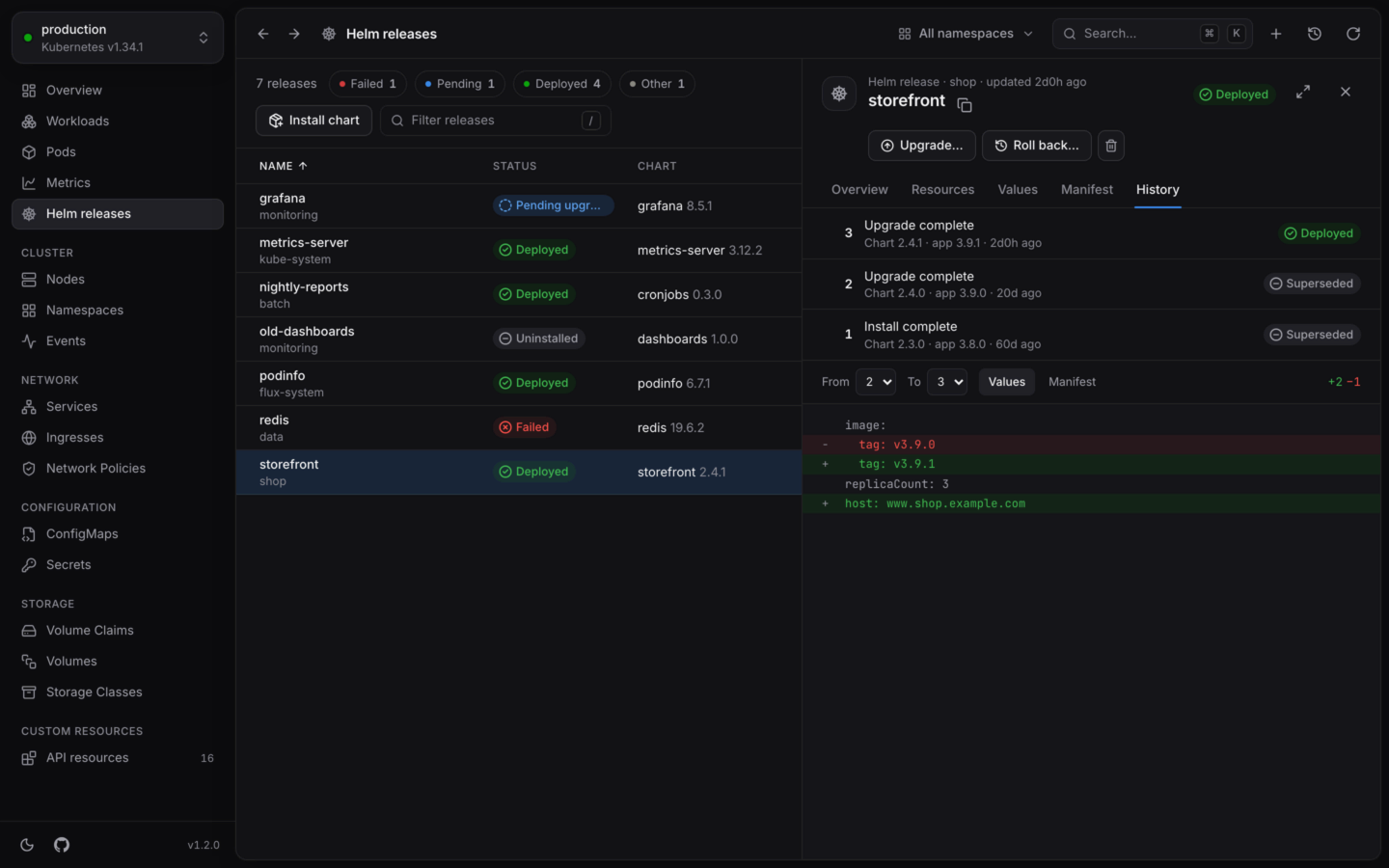
Every revision, newest first, with its description, chart and app version, age and status. Pick any two with **From** and **To**, and compare their **values** or their **manifest**, with lines added and removed counted.
## Releases Flux manages
If a release is managed by [Flux](https://fluxcd.io)'s helm-controller, KubeStacks says so at the top of the release: Flux puts back changes made to it any other way. **Open its HelmRelease** takes you to the `HelmRelease` object, where you can reconcile, suspend or resume it with KubeStacks' [view for Flux](/custom-resources/built-in-views#flux). The upgrade, rollback and uninstall dialogs warn you too.
## What it needs
| To | Your account needs |
| - | - |
| See releases | `list` on Secrets (and ConfigMaps), in the namespace or cluster-wide |
| Change them | Whatever the chart's objects need, since your own `helm` makes the change with your credentials |
Helm 3 and 4 keep each revision of a release in a Secret labeled `owner=helm` (or a ConfigMap, with Helm's `configmap` storage driver). KubeStacks reads both. If your account can't list Secrets, the page says so instead of showing an empty list.
New values or a new chart, reviewed as a dry run first.
From Artifact Hub, a repository or a registry.
This documentation is built and hosted on [Mintlify](https://mintlify.com), a developer documentation platform.